Have you ever spent hundreds of dollars on ads, or months building a beautiful website… only to find that your visitor count is barely in the single digits?
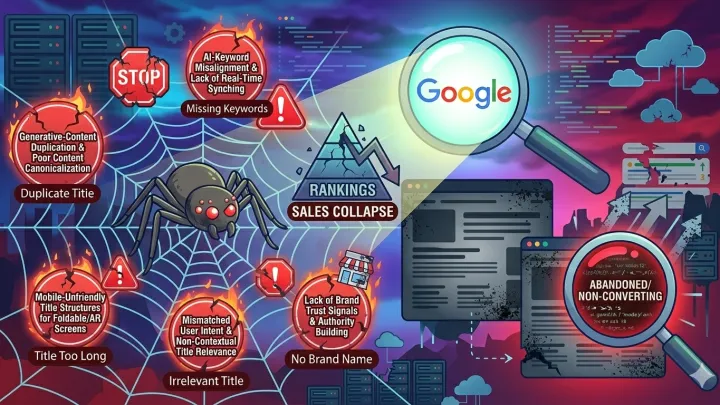
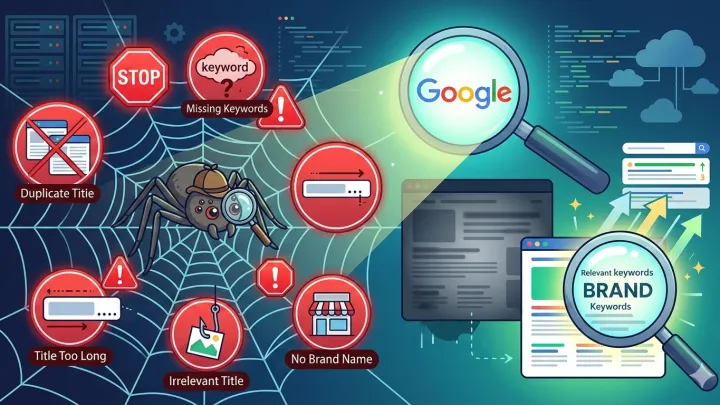
The reason often isn't the quality of your product, or even your price. It’s the Page Title—the one Google sees and implants in search results. If it's weak, even the best content won't be seen.
This article is for you if you own an e-commerce store and feel your SEO efforts aren't bearing fruit. I’ll show you the five mistakes I’ve seen destroy my clients' stores—and mistakes I made myself in my early days—and what you need to change today to boost your Click-Through Rate (CTR) and increase sales.
Why Is This More Crucial Now Than Ever?
In 2026, SEO is no longer a game of keywords and stuffing. Google now understands search intent with incredible precision and displays answers directly via AI Overviews without the need to click on your site. If your page title isn't clear, engaging, and authoritative—you’ll be sidelined.
It’s even more critical for e-commerce stores: users aren't just looking for "information"; they’re looking for a fast solution to buy a reliable product. Your title is the first promise you make to them. If you fail there, they won't trust the rest of your page—even if it's perfect.
Stores that don't update their titles to keep pace with this new reality will gradually vanish from the competition. But you? You have the chance to fix it in minutes.
Mistake #1: Using Generic Titles Like "Our Products" or "Product Page"
In my first project, I wrote titles like "Best Smartphones – Our Store." I thought the word "Best" was enough. But Google only showed me on the last pages. Why? Because the title didn't answer a real question a customer was asking.
Google today evaluates: Does this title satisfy search intent? Does it make the user feel the page will solve their problem? Generic titles send a signal of weakness: "We don't know who we are or who we're writing for."
And when Google sees an ambiguous title, it either doesn't rank it at all or buries it in "secondary results" behind the AI Overview—meaning almost zero traffic.
What should you do now?
- Start the title with a phrase the customer actually searches for—such as "Best wireless headphones under $100" instead of "Wireless Headphones."
- Use tools like Ahrefs or Google Keyword Planner to discover real questions your audience is asking.
- Add a time or quality indicator: "2026," "for Women," "Noise Cancelling," "Fast Shipping."
- Keep the title under 60 characters to avoid being cut off in search results.
Mistake #2: Completely Ignoring Search Intent
A client had a women's fashion store and wrote the title: "Luxury Evening Dresses." The problem? Most people searching for "evening dresses" are in the exploration phase, not buying. Meanwhile, Google shows "Buy" results only to those who type "buy evening dresses online" or "best affordable evening dresses."
The result of the mistake? His pages appeared to an audience not ready to buy, so the bounce rate skyrocketed, and the ranking dropped. Google interpreted this as a "poor experience" and penalized him.
Today, Google doesn't just look at words; it looks at what the user expects after clicking. If your content doesn't match these expectations, the page will be seen as "unreliable."
What should you do now?
- Type the phrase you're targeting into Google and look at the titles appearing in the top 5 results. What do they have in common?
- Classify your intent: Does the user want to buy? Compare? Review? Then make your title reflect that clearly.
- If the goal is a sale, ensure the title contains words like "Buy," "Discount," "Fast Delivery," or "In Stock."
Mistake #3: Copying Competitors' Titles Without Context
I saw a local store copy international titles verbatim: "The Best Running Shoes for Flat Feet." While the translation was correct, the local audience in certain regions used different terms like "supportive sneakers" or "shoes for arch pain."
The result? No visibility in local search. Because Google prioritizes the natural language that the audience actually uses—not literal translations.
In the English-speaking market, nuances in language make a massive difference. The word "Best" might not be the most searched; sometimes "Top Rated" or "Suitable for..." achieves better results depending on whether you're targeting the US, UK, or Australian markets.
What should you do now?
- Use Google Trends to see how your specific target audience expresses their needs.
- Check customer reviews and DMs: What words do they use when describing your product?
- Write titles as if you were answering a real customer's question in a shop—with a natural, clear, and slightly emotional tone.
Mistake #4: Neglecting Optimization for AI Overviews
In 2026, more than [[Stat]]% of searches are answered directly via AI Overviews without a click. If your title isn't designed to be chosen as a "trusted answer," you're missing a huge opportunity.
AI Overviews prefer titles that:
- Start with "How," "Best," "Why," "Comparison between"
- Contain numbers or dates (like "2026")
- Sound objective rather than promotional ("Top 5" instead of "Our Amazing Product!")
Overtly promotional titles are sidelined because Google wants "help," not an "ad."
What should you do now?
- Rewrite category page titles as questions or lists: "Best 7 car chargers for 2026."
- Avoid excessive marketing jargon like "Stunning," "Incredible," or "Unbeatable."
- Make the title look like expert advice, not a salesperson's pitch.
Mistake #5: Never Testing Your Titles
The biggest mistake? Assuming the title is "good enough." For one client's store, we changed a page title from "Smartwatches" to "Best Smartwatches for Men 2026 – Fitness Tracking, Heart Rate, and Message Alerts."
The result? A 142% increase in Click-Through Rate (CTR) within two weeks. Same product, same page… just a different title.
Google rewards titles that people interact with. Every click is a vote of confidence. Every ignore is a penalty.
What should you do now?
- Use Google Search Console to identify titles with high impressions but low CTR—these are golden opportunities for improvement.
- Test two different titles for the same page using tools like Rank Math or Yoast (if your site is on WordPress).
- Change one title today and monitor the CTR after 7 days. Data doesn't lie.
Conclusion: SEO Isn’t Magic… It’s a Promise You Build With Your Customer
A title isn't just a line of code. It’s the first encounter between your brand and a potential customer. If it's vague, generic, or spammy—you’ll lose trust before you even begin.
But if it's clear, helpful, and designed for search intent… it will open the doors to traffic, sales, and even features in AI Overviews.
In 2026, the winners won't be those with the best products, but those who build the best communication with their audience—starting from the very first line that appears in search results.
Now It’s Your Turn
Pick one page on your e-commerce site—the most important or the lowest performing—and change its title today according to the principles above.
Then ask yourself: "Would this title make me click if I were the customer?"
Let us know in the comments: Which title will you rewrite today? Or what is the biggest challenge you face in crafting catchy titles? I'm here to reply personally.